
Off the grid1.2 - Get APK
You'll be able to download in few seconds.
Publisher Description
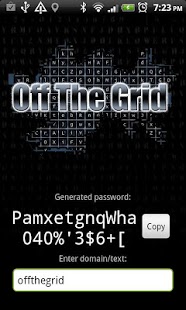
Off the Grid is effectively a password manager that will help you create different passwords for different websites. Passwords are generated by simply typing in text - the program will use a Latin square (of Sudoku fame) to scan for the password using a specific pattern. The generated Latin square (grid) can be printed out and kept safe so that passwords can be retrieved without a device.
This application is a tribute to GRC's work on password generation using Latin squares: https://www.grc.com/OffTheGrid.htm
OTG (Off the Grid) is particularly useful for sharing passwords. You can simply generate a grid and then scan in the QR code on each persons device; they will then all be able to retrieve the password for "example" by simply typing in "example".
This password sharing could be useful for couples/colleagues with various shared accounts or
IT departments that need to access the same servers with the same password.
The following permissions are used:
android.permission.CAMERA - this is to capture the QR codes for previous grids.
android.permission.INTERNET - this is used to collecting analytics on usage of the application. android.permission.WRITE_EXTERNAL_STORAGE - this is used to temporarily write an encrypted zip file to so it can be emailed.
android.permission.WAKE_LOCK - this is used to keep the screen on while the password is displayed.
There is no master password, so it is advised that you also have a remote wipe tool and lock code for your device.
Warning: this app should NOT be used if your device has been rooted. Why? - Off the Grid relies on being sandboxed by Android; when you root your device other applications may be able to read inside the sandbox created for it.
About Off the grid
The company that develops Off the grid is RdyDev. The latest version released by its developer is 1.2.
To install Off the grid on your Android device, just click the green Continue To App button above to start the installation process. The app is listed on our website since 2012-06-08 and was downloaded 0 times. We have already checked if the download link is safe, however for your own protection we recommend that you scan the downloaded app with your antivirus. Your antivirus may detect the Off the grid as malware as malware if the download link to net.rdyonline.offthegrid is broken.
How to install Off the grid on your Android device:
- Click on the Continue To App button on our website. This will redirect you to Google Play.
- Once the Off the grid is shown in the Google Play listing of your Android device, you can start its download and installation. Tap on the Install button located below the search bar and to the right of the app icon.
- A pop-up window with the permissions required by Off the grid will be shown. Click on Accept to continue the process.
- Off the grid will be downloaded onto your device, displaying a progress. Once the download completes, the installation will start and you'll get a notification after the installation is finished.
Program Details
System requirements
Download information
Pricing
Version History
version 1.2
posted on 2012-06-08
Latest update includes additional features for usability: wake lock so the screen stays on while password is displayed and a "speak" button that will read out the password using the phonetic alphabet.
version 1.2
posted on 2012-06-08
Several fixes and updates
Disclaimer
External Download
We do not host Off the grid on our servers. We did not scan it for viruses, adware, spyware or other type of malware. This app is hosted by Galad and passed their terms and conditions to be listed there. We recommend caution when installing it.
The APK Download link for Off the grid is provided to you by apps112.com without any warranties, representations or guarantees of any kind, so access it at your own risk.
If you have questions regarding this particular app contact the publisher directly. For questions about the functionalities of apps112.com contact us.
